How to Make an Online Quiz That Converts Leads
Discover how to make an online quiz that generates high-quality leads. This guide covers quiz strategy, question design, scoring, and promotion.
To build a great online quiz, you first need a clear goal, a set of killer questions, and some simple scoring logic. Then, you wrap it all up in a quiz builder that captures leads. The real secret sauce? Offering instant, personalised value that people are more than happy to trade their email for. It's one of the most effective marketing moves you can make.
Why Quizzes Are a Smarter Way to Generate Leads

Before we get into the nuts and bolts of building a quiz, you need to understand why they flat-out outperform most old-school lead magnets. Think about it: how many eBooks or whitepapers have you downloaded that are now just collecting digital dust in a folder somewhere? It's a one-way transaction with almost zero immediate payoff.
Quizzes flip that script entirely. They create a two-way conversation from the very first click. They work because they tap into a core human driver: we're all desperately curious about ourselves. This little bit of psychological jujitsu provides instant, personalised feedback that feels genuinely valuable.
And in that moment, you collect something incredibly powerful: zero-party data. This isn't scraped or inferred data; it's information your prospects willingly hand over about their goals, their pain points, and even their budget.
The Power of Active Participation
Passively reading a PDF requires minimal effort. Taking a quiz, on the other hand, demands active participation. This simple act of clicking and choosing makes people more invested in the outcome and, by extension, your brand. Because they've put in the work to answer the questions, they're far more likely to give you their email to see the results.
This is why a well-built quiz often sees conversion rates between 40-55%. It’s a world away from the depressing 1-5% you’re lucky to get with a static PDF.
A quiz isn't just another piece of content. It's a diagnostic tool disguised as a fun, five-minute interaction. It helps prospects diagnose their own problems while giving you the exact data you need to sell them the solution.
This isn't a new trend, but it's accelerating. For instance, the e-learning market saw a significant jump in the use of interactive tools as hybrid work became more common. People are tired of filling out boring forms, and quizzes offer a welcome alternative that boosts completion rates. You can dig deeper into the numbers by checking out the market report on online quiz makers.
Turning Data into Qualified Leads
Every single answer a user gives is a data point. It’s a breadcrumb that helps you automatically qualify and segment them without lifting a finger. A smart quiz acts as a filter, sorting the high-intent buyers from the window shoppers long before they ever talk to your sales team.
The numbers don’t lie. Here’s how interactive quizzes stack up against the usual suspects in lead generation.
Interactive Quizzes vs Traditional Lead Magnets
| Metric | Online Quiz | eBook/Whitepaper | Webinar |
|---|---|---|---|
| Engagement | High (Interactive) | Low (Passive) | Medium (Passive viewing) |
| Conversion Rate | 40–55% | 1–5% | 15–25% (for registrants) |
| Data Quality | High (Zero-party) | Low (Contact info only) | Medium (Polls/Q&A) |
| Personalisation | High (Tailored results) | Low (Generic content) | Medium (Topic-specific) |
The contrast is stark. An eBook gets you an email address, maybe. A quiz gets you an email address plus a detailed profile of what that person actually needs.
Ultimately, a quiz shifts your entire lead generation process from a passive data-collection exercise into an active qualification engine. It becomes a predictable machine for building a pipeline, turning idle curiosity into real, sales-ready opportunities.
Pin Down Your Quiz Strategy and Goals
Before you even think about writing a single question, we need to talk strategy. A quiz that actually converts isn't just a fun little distraction—it's a precision-engineered marketing machine built to solve a very specific business problem. Jumping straight into question design is like building a house without a blueprint. Sure, you'll end up with something, but it probably won’t be the thing you actually need.
So, first things first: what does a "win" look like? What's the one single action you need someone to take after they finish the quiz? That goal is going to dictate every single choice you make, from the topic and questions right down to the final call-to-action.
Start with a Real Business Objective
Your quiz needs a job. A purpose. Are you trying to get more demos booked for your sales team? Boost trial sign-ups for your SaaS? Or maybe you just need to segment your email list so you can stop blasting everyone with the same generic nurture sequence.
You have to be specific. A fuzzy goal like "get more leads" is useless because you can't act on it.
Instead, frame your objective around a measurable result.
Weak Goal: Generate leads.
Strong Goal: Generate 50 sales-qualified leads per month with a marketing budget over $5,000 who are trying to solve an automation problem.
Weak Goal: Grow our email list.
Strong Goal: Add 500 new subscribers to our "Advanced SEO" email segment by finding people who are struggling with technical site audits.
See the difference? This kind of clarity forces you to focus. A quiz built to book demos will ask entirely different questions than one designed to segment an audience.
Map Your Quiz to the Buyer's Journey
Next up, you've got to figure out where this quiz fits in your marketing funnel. A quiz that resonates with someone who's never heard of you will completely bomb with someone who's ready to pull out their credit card. Their stage of awareness changes everything.
- Top of Funnel (Awareness): These folks are aware they have a problem, but they don't know about the solutions yet. A "diagnostic" quiz is perfect here. For example, a marketing agency could build a quiz like, "What's Your Digital Marketing Blind Spot?" The goal is purely educational—to introduce your brand as a helpful guide.
- Middle of Funnel (Consideration): Now, they're actively looking at different options. A "recommendation" quiz works wonders. A software company might create a "Which of Our Plans Is Right for Your Team?" quiz. You're not selling hard; you're guiding them to the best fit.
- Bottom of Funnel (Decision): These prospects are on the verge of making a choice. A "readiness assessment" can be the final nudge they need. A consultancy could offer an "Are You Ready to Outsource Your Operations?" quiz. It qualifies their intent and points them directly towards a consultation call.
A great quiz feels like a personalised consultation. It asks the right questions to diagnose a prospect’s unique situation and then delivers a bespoke recommendation, basically automating the first part of a sales call.
Define Your Ideal Lead Profile
Okay, with a sharp goal and a clear funnel stage, you can finally define what a "qualified lead" actually looks like based on their quiz answers. This is where you connect their responses to actual business value. You're not just collecting random answers; you're hunting for signals of intent.
Let's say you sell project management software. A lead who answers that their team has more than 20 people and their biggest headache is "missed deadlines" is infinitely more valuable than a freelancer who's just "curious."
Before you build anything, sketch out a simple profile of your perfect lead.
- Who are they? (e.g., Marketing Manager at a B2B SaaS company)
- What problem are they wrestling with? (e.g., Inefficient lead nurturing)
- What answer signals high intent? (e.g., A response revealing they have a budget approved for a solution in the next 3 months)
Treat this profile as your North Star. It ensures every question you write is designed to do one thing: find and attract your ideal customer.
Designing Questions That Uncover True Intent
The questions you ask are the engine of your quiz. They're the direct line between a user's idle curiosity and the juicy, actionable data your sales team craves. Crafting the right questions is an art, a delicate balance between engaging language and sharp strategic purpose.
Your real goal? Uncover pain points, budget, and project timelines without ever making the user feel like they're being interrogated.
Every question has to feel like a step toward a genuinely valuable, personalised result. This creates a powerful value exchange: they give you information, and you give them an insightful answer to a problem they actually care about. That’s how a simple quiz becomes a killer diagnostic tool.
Choosing the Right Question Formats
The format of your questions can make or break the user experience and the quality of data you collect. You’ll want to mix and match formats to keep things dynamic and ask for different types of information in the most effective way.
Here are the heavy hitters and when to use them:
- Multiple-Choice: This is the workhorse of most quizzes. Use it for clear-cut questions about roles, company size, primary challenges, or goals. It's fast, dead simple for users, and gives you clean data for segmentation.
- Image-Based Questions: These are fantastic for breaking up walls of text and making the quiz more visually appealing. They work perfectly for questions about style, preferences, or visual concepts. A branding agency could ask, "Which of these logos best captures your company's vibe?"
- Scales or Sliders: When you need more nuanced answers, scales are your best friend. Use them to gauge things like budget ranges, confidence levels, or the severity of a pain point. A question like, "On a scale of 1-10, how urgent is solving this problem?" tells you so much more than a simple yes/no.
By mixing these up, your quiz starts to feel less like a test and more like an interactive conversation.
Uncovering Qualification Data Without Being Obvious
Okay, let's talk about the hard part: asking for sensitive info like budget and timeline. If you just blurt out, "What's your budget?" you're going to scare a lot of people away. It feels too salesy, too soon.
The trick is to frame these questions around their problems and goals.
You need to make the qualification questions feel absolutely necessary for delivering an accurate, helpful result. The user gets it—for you to help them, you need a little context.
The best quiz questions don’t feel like questions at all. They feel like a guided self-discovery process, where each answer brings the user closer to a moment of clarity about their own business challenges.
For example, instead of asking about budget directly, try this:
"Which of the following best describes your current investment in marketing technology?"
- A. We're just exploring free tools for now.
- B. We have a modest monthly budget for essential tools.
- C. We are actively investing in platforms to scale our growth.
See? It feels less intrusive but gives you the exact same critical data. To gauge their timeline, you could ask, "How soon are you hoping to see results from a new solution?" This frames the question around their desired outcome, not your sales cycle.
If your current lead magnets aren't giving you this level of insight, it's probably time for an audit. You can use a free tool like Magnethive to get a report on your existing assets and receive AI-powered ideas for new ones—like a quiz—that can capture this kind of zero-party data.
Designing a Logical and Engaging Flow
The order of your questions is just as important as the questions themselves. A janky, poorly structured flow will cause people to bail, no matter how brilliant your questions are. The key is to build momentum and trust as the user clicks through.
A proven structure looks something like this:
- The "Easy In" Question: Start with something broad, low-friction, and maybe even a little fun to answer. This gets the user invested immediately. For a project management tool, you could ask, "What's your team's spirit animal when a project is going well?"
- The Pain Point Questions: Once they're warmed up, start probing their challenges. These questions should help the user self-identify the exact problems you solve. Think, "What's the biggest bottleneck in your current workflow?" or "What single task do you wish you could automate away forever?"
- The Qualification Questions: After you've established context and built some trust, you can gently slide in the more direct qualifying questions about company size, role, budget, and timeline, using that subtle framing we just talked about.
- The Final "Promise" Question: End with a question that reinforces the value they're about to receive. Something like, "Ready to discover your personalised action plan to fix these issues?" This builds anticipation for the results page and makes that lead capture form feel like a tiny hurdle to a big payoff.
This logical progression guides the user seamlessly from initial curiosity to a point where they are genuinely eager to see their results, making them far more likely to hand over their contact info to get them.
Building a Smart Scoring and Segmentation System
A quiz without a smart scoring system is just a fancy survey. This is where the magic happens—where you turn raw answers into actual data, transforming curious visitors into qualified, segmented leads ready for the right conversation.
The idea is to assign a value to different answers and use that total score to sort leads into different buckets. Get this right, and every single follow-up you send will be perfectly tuned to where that prospect is in their journey. It's a total game-changer for conversion rates.
Understanding Scoring Models
Before you can build anything, you have to get your head around what is lead scoring. It’s the foundation for turning quiz responses into a predictable sales pipeline, but it doesn't need to be rocket science to work.
You can start simple and add complexity later as you collect more data.
- Simple Point Scoring: This is the most straightforward route. You assign a specific point value to each answer. For example, an answer signalling a bigger budget or a more urgent problem gets more points. Easy.
- Weighted Scoring: This model takes it a step further by giving certain questions more importance. A question about budget might be worth twice as much as a question about team size because it’s a much stronger buying signal.
- Persona Mapping: This is a more advanced play where answers don't just add points but map directly to predefined buyer personas. For instance, answering "A," "C," and "D" might flag a user as "Enterprise Eric," who needs a specific solution.
So, which one is for you? If you're just looking to qualify leads, a weighted scoring system usually hits that sweet spot between ease and effectiveness. For highly personalised funnels, persona mapping is incredibly powerful.
From Scores to Segments
Once you have a scoring system in place, the next job is to create clear "outcome buckets," or segments. This is how you decide what happens after someone finishes the quiz. Each bucket should tie to a different level of qualification or a specific user need.
A quiz should function like an automated triage system. It quickly diagnoses a lead's situation, sorts them into the right category, and routes them to the exact resource or person who can help them best, all within a matter of minutes.
Let's say a B2B software company has a quiz with scores ranging from 0 to 100. Their segmentation might look something like this:
| Score Range | Segment Name | Lead Status | Automated Action |
|---|---|---|---|
| 80-100 | Sales-Ready | Hot | Route directly to sales for a demo booking. |
| 40-79 | Nurture-Track | Warm | Enrol in a targeted email sequence about their pain points. |
| 0-39 | Low-Fit / Student | Cold | Add to general newsletter list for long-term education. |
This structure protects your sales team's time, making sure they only talk to the hottest leads while everyone else gets value-driven content that warms them up. It's so much more effective than a one-size-fits-all follow-up. If you're using a specific CRM, you can even explore how to automate this with tools like lead scoring in HubSpot.
This decision tree gives you a visual for how to structure your questions to pull people in, qualify them, and ultimately get them to convert.
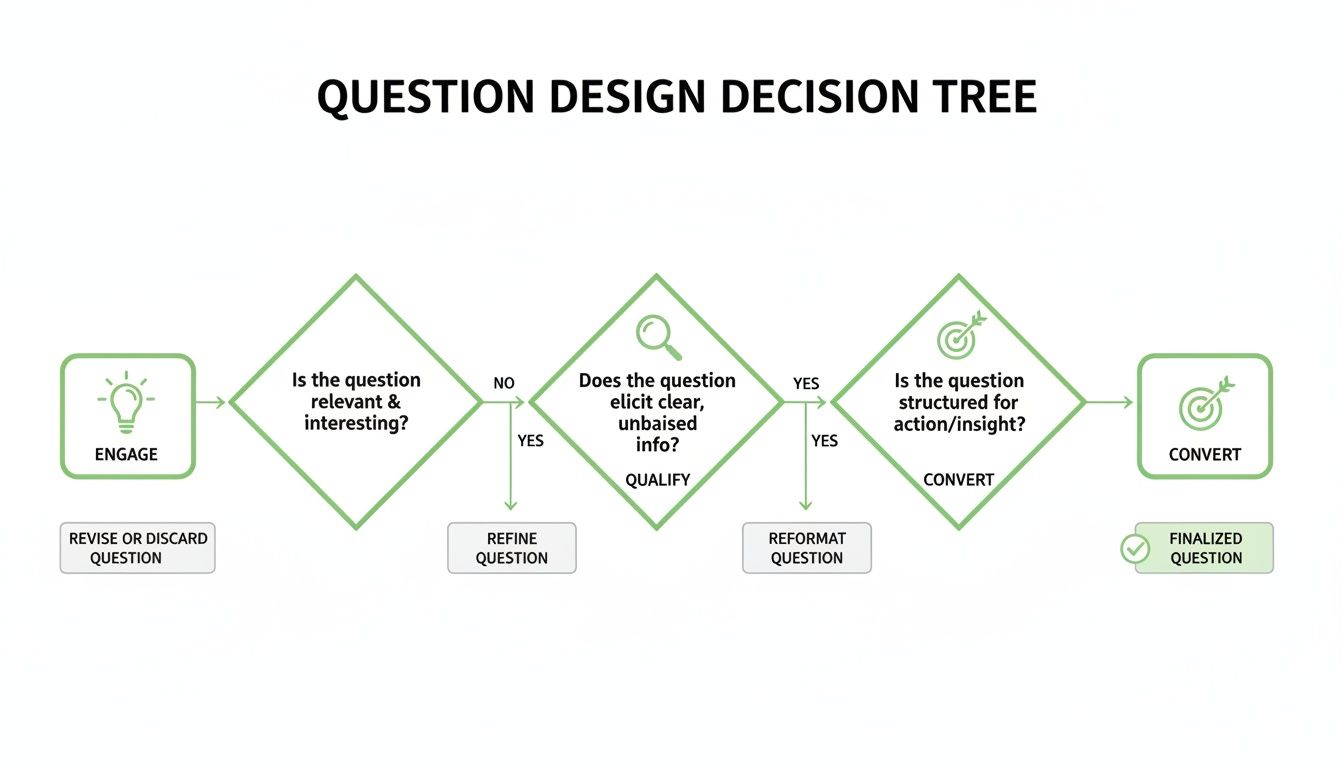
The flowchart shows how the first questions should be low-friction to get users hooked, followed by deeper questions that uncover needs, and finally, questions that drive toward your conversion goal.
100% Free Lead Magnet Audit
Our AI analyzes your website and delivers custom growth strategies in seconds.
Practical Implementation Example
Let's pull this all together with a real-world example. Imagine you're a marketing agency trying to qualify leads for your SEO services. You could build a quiz called "What's Your SEO Score?"
One of your questions could be:
"What is your biggest SEO challenge right now?"
- A. Driving more organic traffic. (+10 points - General pain point)
- B. Ranking for competitive keywords. (+20 points - Specific, higher-intent problem)
- C. Proving the ROI of our SEO efforts. (+30 points - Advanced, budget-related challenge)
Another question could be about their timeline:
"How quickly do you need to see improvements?"
- A. Just exploring options for the future. (+5 points - Low urgency)
- B. Within the next 6 months. (+15 points - Moderate urgency)
- C. As soon as possible, it's a priority. (+25 points - High urgency)
After just a few questions like these, the scores will automatically separate the hot leads from the tyre-kickers. A user who scores 85 gets an immediate prompt to book a free SEO audit. Someone who scores 35 gets a helpful eBook on "The Basics of SEO."
This is how you build a quiz that doesn't just collect email addresses—it builds a genuine, qualified pipeline.
Choosing the Right Tech Stack and Tools
Alright, you've got your strategy, questions, and scoring logic dialled in. Now for the fun part: picking the tech that brings your masterpiece to life.
This is a bigger decision than it looks. The tools you choose will dictate how fast you can build, how smoothly it talks to your other marketing systems, and ultimately, how well it actually performs. It really boils down to a classic showdown: a slick, no-code platform versus a completely custom-built solution.
Making the right call here will save you a world of pain later. If you want to go deeper into the technical weeds, there are some great resources on choosing the right technology stack for your project.
No-Code Quiz Builders The Popular Choice
For most marketers, a dedicated no-code quiz builder is the only sane choice. I'm talking about platforms like Typeform, Outgrow, or Involve.me. They're built from the ground up to help you make an online quiz without touching a single line of code.
These tools hit that perfect sweet spot between power and simplicity. You get templates, drag-and-drop editors, and analytics baked right in. The whole process, from a blank page to a live quiz, gets ridiculously fast.
Think about the key wins here:
- Speed to Market: You can genuinely build and launch a professional quiz in an afternoon. Not weeks. Not months. An afternoon.
- Lower Upfront Cost: A predictable monthly subscription is a hell of a lot cheaper than hiring a team of developers. It's not even close.
- Built-in Integrations: The best ones connect directly to your CRM, like HubSpot or Salesforce, so your lead data flows exactly where it needs to, automatically.
The real magic of no-code isn't just speed; it's that it puts the power back in the hands of the marketing team. You can create, test, and tweak without ever having to file a ticket with IT. That freedom is everything.
Of course, it's not all sunshine and rainbows. You're playing in their sandbox, so you're limited by the platform's features. Super-specific branding or a truly bizarre user experience might be off the table. But for 95% of lead-gen goals? These tools are more than enough.
When to Consider a Custom-Coded Solution
While no-code is the go-to, there are rare times when a custom build makes sense.
If your quiz needs some kind of proprietary, mind-bendingly complex logic, or a user interface so unique it can't be faked with a template, then building it from scratch is your only option. Maybe you need to integrate with some ancient, in-house system that doesn't have an API. That's custom-build territory.
This path gives you 100% control over every single pixel and function. But that control comes at a steep price—both in money and time. You'll need developers, a project manager, and you'll be on the hook for all future maintenance. This is typically reserved for huge, enterprise-level projects where the quiz is practically a core product in itself.
To see how the no-code players stack up against each other, check out our comparison guide of the top online quiz makers on the market.
To help clarify the decision, let's break down the core differences.
Quiz Builder Technology Comparison
This table lays out the fundamental trade-offs between grabbing a no-code tool off the shelf and building your own from the ground up.
| Factor | No-Code Quiz Builders | Custom-Coded Solution |
|---|---|---|
| Cost | Low, predictable monthly fees (300/mo). | High upfront cost (50,000+) plus ongoing maintenance. |
| Time to Launch | Hours or days. | Weeks or months. |
| Flexibility | Limited by the platform's features. Good for most use cases. | Total control. Limitless customisation for UI, logic, and integrations. |
| Technical Skill | None. Designed for marketers and non-developers. | Requires a dedicated team of skilled developers (front-end, back-end). |
| Maintenance | Handled by the platform provider. Updates are automatic. | Your responsibility. Requires ongoing developer time for bugs, security, and updates. |
| Integrations | Pre-built for major CRMs and marketing tools (HubSpot, Mailchimp, etc.). | Can be built for any system with an API, but requires custom development. |
The choice really hinges on your specific needs. For most businesses aiming to generate leads, a no-code builder provides all the power you need without the massive overhead of a custom project.
Key Features to Look For in Any Tool
Whether you go no-code or custom, some features are simply non-negotiable. Don't even consider a tool that doesn't have these basics covered:
- Conditional Logic: This is table stakes. The ability to show different questions based on past answers is what makes a quiz feel personal and smart, not like a dumb form.
- Robust Analytics: You absolutely need to see start rates, completion rates, and where people are dropping off. Without this data, you're flying blind and can't optimise anything.
- Seamless CRM Integration: The whole point is to capture leads. The tool must talk to your CRM effortlessly to pass over contact info and their answers for segmentation and follow-up.
- Customisable Design: Your quiz shouldn't look like it came from a different company. You need control over colours, fonts, and logos to make it feel like a natural part of your brand.
At the end of the day, the right tech stack is the one that fits your budget, your team's skills, and your business goals. For most of us, a powerful no-code builder is the perfect launchpad for creating a quiz that actually gets results.
Optimising Your Funnel for Maximum Conversions
Getting your quiz live is a huge milestone, but it's the starting pistol, not the finish line. If you want those game-changing conversion rates, you have to stop thinking of it as a standalone quiz and start treating it as the heart of a high-performance funnel.
This means every single piece—from the landing page that grabs attention to the results page that delivers value and the email sequences that nurture the lead—needs to work in perfect harmony, guiding people toward your end goal.
Crafting a High-Converting Landing Page
Your quiz landing page has exactly one job: get the click. It needs to be irresistible. This comes down to a magnetic headline and a value proposition so clear it hurts.
Forget generic invitations like "Take our Quiz." That’s lazy. Instead, you need to promise a specific, desirable outcome.
A headline like "Marketing Agency Quiz" will get ignored. But "What's Your #1 Marketing Blind Spot? Uncover It in 2 Minutes" sparks genuine curiosity. It promises a tangible insight, an 'aha!' moment. For a deeper dive, we've broken down exactly how to build pages that convert in our guide to best practice landing page design.
Your landing page must sell the result of the quiz, not the quiz itself. People don't want to take a quiz; they want the personalised answer or diagnosis it provides.
Designing a Results Page That Drives Action
The results page is where the real magic happens. This is your chance to deliver on the promise you made on the landing page. Give them genuinely useful, personalised insights based on their answers.
Generic outcomes are a massive turn-off. The user needs to feel like you truly understand their situation. Once you've delivered that value, you've earned the right to ask for the next step with a clear call-to-action (CTA).
If their results show they're a perfect fit for what you offer, hit them with a direct CTA like, "Book a Free Strategy Call." If they're not quite there yet, offer something softer, like downloading a relevant case study. This segmentation is how you turn a good funnel into a great one.
Automating Personalised Post-Quiz Follow-Up
The real power of a quiz funnel is unlocked with smart, automated follow-up. You've already done the hard work of segmenting leads based on their answers, so for goodness' sake, don't send them a generic welcome email.
Instead, build out tailored nurture sequences for each segment you’ve identified:
- Hot Leads (High Score): These folks should get an email from a sales rep almost immediately, with a direct link to their calendar. Make it feel personal by referencing one of their answers, like, "I saw you're struggling with lead qualification..."
- Warm Leads (Mid Score): Nurture these leads with a 3-part email series addressing their specific pain points. Send them helpful content and case studies before going for a softer CTA.
- Cool Leads (Low Score): No need to be pushy here. Just add them to your general newsletter to keep your brand top-of-mind.
A/B Testing for Continuous Improvement
Your first draft of this funnel won't be your best. That's okay. The pros know that continuous improvement is the name of the game, and that means testing everything. Don't guess what works—let the data tell you.
Here are a few critical elements to start A/B testing right away:
- Landing Page Headline: Pit a curiosity-driven headline against a benefit-driven one.
- Number of Questions: Does a shorter, 7-question quiz get more completions than a more thorough 12-question one? Test it.
- CTA Copy: Does "Book a Demo" outperform "See a Live Walkthrough"? You won't know until you try.
- Email Subject Lines: Test different angles for your follow-up emails to see what gets the highest open rates.
By methodically testing each component, you can systematically lift your conversion rates over time. This is how you make an online quiz that transforms from a simple lead magnet into a predictable, revenue-generating machine.
Got Questions? I've Got Answers
Alright, you've got the strategy down, but maybe a few nagging questions are bouncing around in your head. Happens every time. Let's tackle the most common ones I hear from marketers right before they launch their first quiz.
How Many Questions Should My Quiz Have?
The sweet spot is somewhere between 7 and 12 questions. Trust me on this.
It's a delicate balance. Go shorter than seven, and your quiz feels flimsy, almost like you can't possibly deliver a credible result. Push it past 15, and you'll see your drop-off rates skyrocket. People just get tired.
The 7-12 range is long enough to gather the data you need for smart segmentation but short enough to keep people engaged right to the end. The real trick is to make sure every single question pulls its weight—it either has to qualify the lead or make their final result more personal and valuable. No filler.
What's the Best Way to Promote My Quiz?
Don't just build it and hope they come. You've got to meet your audience where they already hang out. Weave it into everything you're already doing.
- Your Website: This is your home turf. Stick it on the homepage, embed it in relevant blog posts, and drop it onto your main service pages. Make it an unmissable call-to-action.
- Social Media: Get it out on platforms like LinkedIn. Don't just post a link; talk about the value of the results. Spark some curiosity and make people want to find out their score or type.
- Paid Ads: Running campaigns on LinkedIn or Facebook? Use the quiz as your top-of-funnel offer. It’s a much more compelling hook than another boring ebook download for a cold audience.
- Email List: Announce it to your subscribers. This is a killer way to re-engage your list and, more importantly, learn a ton about what they actually need from you right now.
How Do I Know if My Quiz Is Actually Working?
To figure out if your quiz is a winner, you need to look beyond just one number. You've got to track a mix of engagement and conversion metrics to see the whole story.
Measuring a quiz is about more than just lead volume. It’s about tracking the entire journey from the first click to a qualified sales opportunity. This data shows you exactly where your funnel is strong and where it needs work.
Keep a close eye on these four KPIs:
- Start Rate: What percentage of people who see the quiz landing page actually click the "start" button? This tells you if your headline and intro copy are compelling enough.
- Completion Rate: Of all the people who start, how many make it to the very end? If this number is low, your questions might be too long, too confusing, or just plain boring.
- Lead Conversion Rate: This is the big one for lead gen. What percentage of people who finish the quiz actually hand over their email to see the results? This is the ultimate test of your lead capture form.
- Lead-to-Customer Rate: This is where the rubber meets the road. Of all the leads your quiz generates, how many turn into paying customers? This metric reveals the true quality of the leads you're attracting.