Automation in Email Marketing: Boost Conversions with Smart Workflows
Discover automation in email marketing: learn effective workflows, segmentation, and tactics that drive real conversions.
Email marketing automation isn't just about scheduling emails. It’s about creating a system that sends smart, targeted, and personalized messages to people based on what they actually do. It’s a complete shift away from old-school "batch-and-blast" campaigns. Instead of shouting at everyone, you’re having a one-on-one conversation that scales.
This is how you nurture leads, welcome new customers, and win back old ones—all without lifting a finger every single time.
The Core Principles of Email Automation
At its heart, automation is simple: send the right message to the right person at the right moment. It’s a world away from sending one generic email to your entire list, hoping something sticks.
Modern automation runs on a powerful "if-then" logic. If a user does something specific (the trigger), the system checks if they meet certain criteria (the conditions), and then it does something in response (the action). This simple framework is what lets you build incredibly personal customer journeys that adapt in real time.
Understanding Triggers and Actions
The trigger is what kicks off an automated workflow. It’s the starting gun. A new subscriber signing up is a classic trigger, but we can get way more sophisticated than that. A trigger could be someone clicking a link in a specific email, abandoning a shopping cart, or even getting a certain score on an interactive quiz you built.
The action is what your system does next. Usually, it's "send an email," but that's just scratching the surface. An action could also be:
- Adding a tag like
hot_leadto a contact. - Moving a subscriber from a "prospects" list to a "customers" segment.
- Updating a contact field, maybe changing their status from
leadtoMQL. - Sending a Slack notification to a sales rep when a lead shows high intent.
This trigger-and-action engine is what drives real, personalized communication at scale. When you connect your automation platform to your CRM, you create a seamless data flow that makes your customer profiles richer and your marketing smarter. We've written more about how the two systems work together over at our guide on marketing automation and CRM.
To help you get a clearer picture of how these elements fit together, here’s a quick breakdown.
Key Components of an Email Automation Workflow
This table outlines the fundamental building blocks of any automated email workflow, showing how triggers, conditions, and actions work in harmony.
| Component | Description | Practical Example |
|---|---|---|
| Trigger | The specific event that initiates the workflow. | A user submits their results from an interactive ROI calculator on your website. |
| Condition | A set of rules that segment or filter which contacts proceed down a path. | The workflow checks if the user's calculated ROI is greater than 200%. |
| Action | The task executed by the automation system when the trigger and conditions are met. | If the ROI is >200%, the system tags the contact as high_value and sends them a personalized case study email. |
| Delay | A timed pause between actions to make the sequence feel more natural. | Wait 2 days before sending the next email in the sequence. |
| Goal | The desired outcome that, when achieved, can end the workflow for that contact. | The contact books a demo call, which removes them from the lead nurturing sequence. |
Understanding these components is the first step. The real magic happens when you fuel them with the right data.
The Power of Real-World Data
Automation truly comes alive when it’s powered by rich, first-party data. Interactive tools like quizzes, calculators, and assessments are absolute goldmines for this. You’re not just grabbing an email address; you're capturing deep insights—their budget, their biggest pain point, their current skill level. This is the data you use to trigger hyper-relevant automated sequences.
Imagine a user finishes your "marketing maturity assessment." If they score as a beginner, they're automatically dropped into a welcome series full of foundational, 101-style content. But if they score as an expert? They get an immediate invite to an advanced webinar.
By connecting user behaviour directly to your email workflows, you move from making educated guesses to having data-driven conversations. This is the difference between marketing at someone and building a relationship with them.
The results speak for themselves. Automated emails often see higher open and click rates compared to standard campaigns. For a deep dive into the nuts and bolts of setting this up, check out this guide on Mastering Email Automation and Recurring Emails. These results aren't magic; they’re the direct result of sending timely, relevant content that people actually want.
If you're not sure how well your current lead magnets are performing, it's worth running a quick audit. You can use a free tool like the Magnethive lead magnet audit tool to generate a comprehensive report with AI-powered lead magnet ideas. It’ll show you the potential ROI of optimizing your lead magnets to fuel these powerful automation workflows.
Connecting Lead Generation Tools to Your Workflows
Here’s where most email automation goes wrong: it starts with the email.
The real magic happens way earlier, at the sign-up. Generic forms asking for just a name and email are a massive missed opportunity. The power comes from plugging interactive tools—quizzes, calculators, assessments—directly into your marketing workflows. This turns a simple sign-up into a rich customer profile from the very first click.
This is all about capturing zero-party data—the gold dust a customer willingly hands over. Think about it. When someone uses your ROI calculator or takes a quiz, they're not just giving you contact info. They're telling you their problems, their budget, and exactly what they need help with.
Mapping User Inputs to Actionable Triggers
The trick is to map what a user tells you in one of these tools to a specific, actionable trigger inside your email platform. You’re essentially building a direct bridge between their stated need and the personalized marketing they get moments later.
Let’s see how this looks in the real world:
- Quizzes: A visitor takes your "What's Your Marketing Skill Level?" quiz. They get tagged as "Beginner," "Intermediate," or "Advanced" based on their score. No more generic welcome emails.
- Calculators: A potential client uses your pricing calculator and punches in a budget over $10,000 per month. That's not just data; it's a hot lead signal that should instantly ping a sales rep for a high-priority follow-up.
- Assessments: Someone completes your "Business Cybersecurity Risk Assessment" and scores "High Risk." Boom. An automated sequence kicks off, sending them a super-relevant guide on network hardening.
This isn’t rocket science, but it’s incredibly effective. You bypass the fluff and jump straight into conversations that matter. For a deeper dive on building this entire pipeline, check out our guide on creating a modern lead generation system.
Turning Data into Dynamic Content
Once that data is flowing into your email system, you can get seriously clever with dynamic content. And I'm not just talking about [First_Name]. I mean swapping out entire content blocks, calls-to-action, and offers based on the tags and data they just gave you.
Imagine a real estate agency using a "Home Buyer Quiz."
- Someone tagged
first_time_buyergets an email with a link to a "Beginner's Guide to Mortgages." - Another contact tagged as
investorgets an email showcasing the latest multi-family properties with high rental yields.
This isn't just segmentation; it's true personalization. You’re reflecting their own needs back at them, showing you actually listened. That builds trust faster than any one-size-fits-all newsletter ever could.
Choosing the Right Technology Stack
So how do you actually wire all this up? Your tools need to talk to each other seamlessly. When you're scoping out your options, it helps to know who the key players are among leading marketing SaaS companies that offer solid automation platforms.
Most modern tools have direct integrations or can be linked up with a service like Zapier. When you’re vetting your tech, make sure it can do these three things, non-negotiable:
- Apply tags based on user answers: This is the absolute baseline for segmenting leads from interactive tools.
- Update custom fields: You need to store specific data points—like a budget from a calculator or a score from an assessment—right on the contact record.
- Trigger workflows from custom events: The best systems let you kick off an entire automation the second someone completes your tool.
Get this connection right, and you've built a machine that doesn't just capture leads—it qualifies, segments, and nurtures them with insane relevance from the moment they land in your world.
Building Smart Workflows With Segments and Lead Scoring
Alright, so your interactive tools are now pumping rich, first-party data into your email platform. This is where the real fun begins. You can finally stop thinking in terms of simple, one-way email blasts and start building intelligent journeys that react to what your users actually do.
Forget the one-size-fits-all welcome series. It’s time to build dynamic workflows that guide each lead down a path that’s right for them. The two magic ingredients for this are segmentation and lead scoring. One groups people by what they have in common, the other tells you who’s ready to buy.
This simple flow chart nails the basic concept: a quiz captures data, a tag gets applied based on the answers, and a perfectly relevant email goes out.
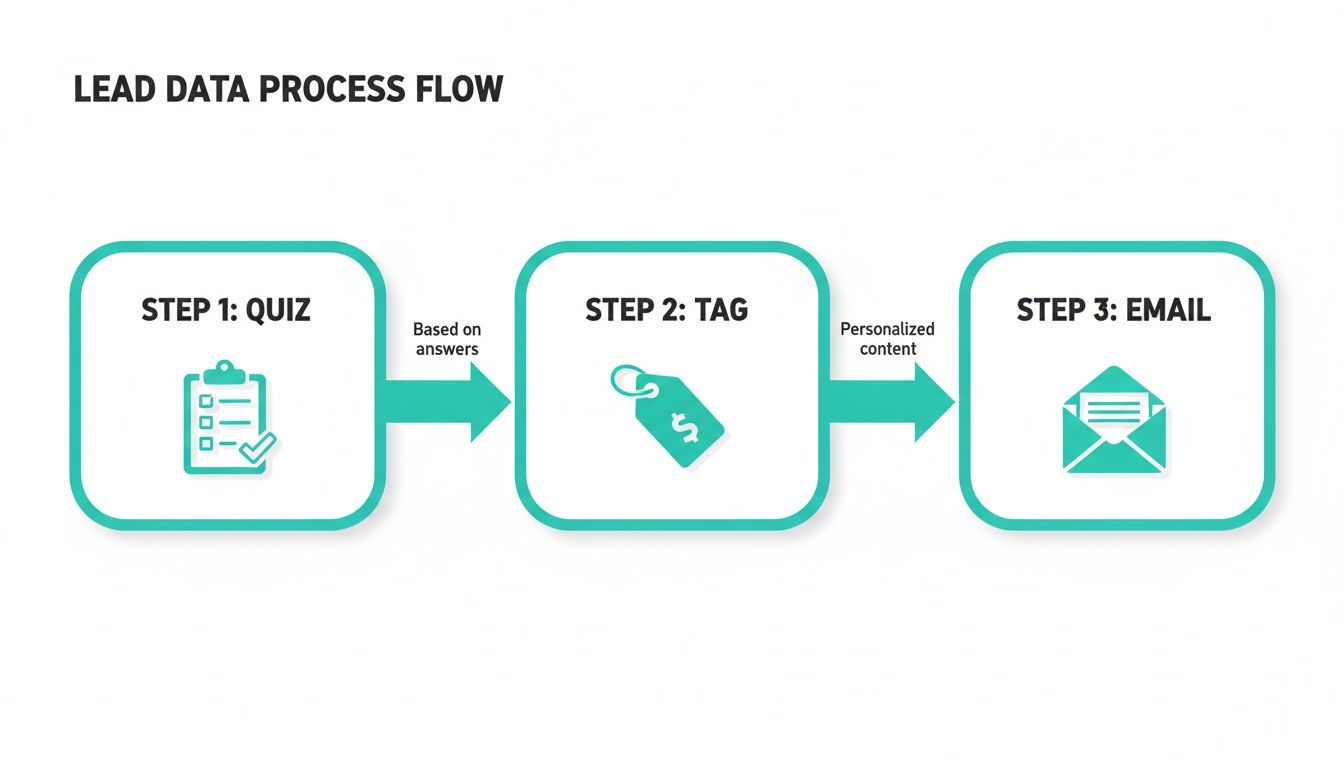
This is the bedrock of a smart workflow. You’re turning a single interaction into a targeted, automated follow-up.
Using Segments to Create Conditional Paths
The data you get from a quiz or calculator is segmentation gold. It lets you immediately split your audience into meaningful groups. In your email platform, you'll use a conditional split (often called an "if/then" branch) to make this happen. It just checks a contact's tags and sends them down the right path.
Here’s how a SaaS company might do it:
- Trigger: A user finishes a "Feature Needs Assessment" quiz.
- Condition 1: Are they tagged as
enterprise_need?- Yes Path: Boom. They get a sequence all about security, scalability, and dedicated support.
- Condition 2: Are they tagged as
small_business_needinstead?- Yes Path: They get emails focused on affordability, getting started quickly, and ease of use.
This simple branching logic means that from the very first email, you're hitting on the exact pain points of different customer types. It’s why B2B marketers live and breathe email automation. In fact, email marketing holds a significant share of the entire marketing automation market, making it a crucial piece of the pie for driving sales.
Introducing Lead Scoring for Prioritization
Lead scoring takes things a step further. It's a system where you assign points to leads based on who they are and what they do. This gives you a numerical score that signals how ready they are to talk to sales, letting your team focus their energy where it'll have the most impact.
Lead scoring isn't just about finding hot leads; it's about timing. It tells you who's ready for a sales call right now versus who needs a bit more warming up.
You'll want to assign points for both demographic data (who they are) and behavioral data (what they do).
A Few Scoring Examples:
- Demographic Scoring (The "Who"):
- Job Title is "Director" or "VP": +20 points
- Company has over 100 employees: +15 points
- Behavioral Scoring (The "What"):
- Visited your pricing page: +10 points
- Opened 3+ emails in a week: +5 points
- Downloaded a case study: +15 points
- Clicked a link in an email: +3 points
If you're using HubSpot and want a deep dive into setting this up, check out our comprehensive guide on lead scoring in HubSpot.
Before we dive into building a workflow around these scores, let's quickly see how this automated approach stacks up against doing things the old, manual way.
Manual Segmentation vs Automated Workflows
| Feature | Manual Segmentation | Automated Workflows |
|---|---|---|
| Trigger | Manual export/import of lists based on static criteria. | Real-time, based on user actions (e.g., quiz completion). |
| Personalization | Broad messages sent to large, static groups. | Hyper-relevant content based on individual data and scores. |
| Scalability | Extremely time-consuming; breaks down as your list grows. | Infinitely scalable; runs 24/7 without manual intervention. |
| Lead Qualification | Guesswork based on limited data points; slow handoff. | Automatic (MQL status) when a score threshold is met. |
| Sales Handoff | A sales rep gets a spreadsheet of leads to call, eventually. | Instant notification and CRM task creation for sales reps. |
| Data Utilization | Relies on basic properties like location or sign-up date. | Leverages rich behavioral and demographic data points. |
As you can see, the difference is night and day. Automation lets you build a system that works for you, while manual segmentation means you’re constantly working for the system.
100% Free Lead Magnet Audit
Our AI analyzes your website and delivers custom growth strategies in seconds.
Building a Score-Driven Workflow
Once your scoring is live, you can build workflows that kick into gear as a lead's score changes. A classic move is to set a score threshold—let's say 100 points—that officially qualifies a lead for a sales conversation.
Here’s what that score-driven workflow looks like in practice:
- Entry Trigger: A contact's lead score is updated.
- Conditional Check: Is their new score 100 or more?
- "Yes" Path: Congrats, you have a Marketing Qualified Lead (MQL). The workflow instantly:
- Adds a tag like
sales_ready. - Assigns the contact to a sales rep in your CRM.
- Fires off an internal notification to the sales team (Slack, email, you name it).
- Adds a tag like
- "No" Path: No problem. The contact stays in a nurturing sequence designed to boost their engagement and, you guessed it, their score.
This system creates a perfect, seamless handoff between your marketing and sales teams. High-intent leads get attention immediately, while everyone else keeps getting value. It turns your email marketing from a simple broadcast tool into a powerful engine for qualifying and converting leads.
Crafting High-Converting Emails for Your Sequences
Automation is the engine, but your email copy is the fuel.
You can build the most sophisticated, perfectly timed workflow in the world, but if the emails are bland, generic, or just plain boring, it's all for nothing. A great automated email that says nothing of value will always fail.
This is where the magic happens—where the art of copywriting meets the science of automation. The goal is to create messages that don't just get opened; they get results.
Every single email in a sequence, whether it’s for welcoming new subscribers or winning back old ones, needs a laser-focused purpose. Before you even think about writing, ask yourself: what is the one thing I want this person to do or feel after reading this email? Is it to build trust? Drive a sale? Book a demo?
That answer dictates everything that follows.
The Anatomy of an Email That Actually Works
When you boil it down, a high-performing automated email has three core jobs to do. First, a subject line that earns the click. Second, body copy that delivers on that promise. And third, a call-to-action that’s impossible to misunderstand.
Nail these three, and you're already ahead of the game in automation in email marketing.
Your subject line has one mission: stand out in a ridiculously crowded inbox and get the damn thing opened. Forget the clickbait. Focus on curiosity, urgency, or straight-up value.
- Curiosity: "Your [Quiz Result Topic] Action Plan"
- Urgency: "Your free trial access expires in 24 hours"
- Value: "3 templates to solve [Problem]"
Next, the body copy. This is where you fulfill the promise you made in the subject line. This is absolutely not the place for a hard sales pitch. Instead, you need to zero in on the subscriber’s problem and show them you understand it. A simple but incredibly powerful framework for this is Problem-Agitate-Solve (PAS).
- Problem: State the pain point you know they're dealing with.
- Agitate: Pour a little salt in the wound. Emphasize the frustration and consequences of that problem.
- Solve: Introduce your way of thinking or your product as the clear path forward.
Finally, your Call-to-Action (CTA). It must be specific and singular. Tell people exactly what you want them to do next. Use action-packed language like "Get Your Free Template" or "Book Your 15-Minute Demo" instead of the lazy, vague "Click Here."
Framework for a 5-Part Welcome Sequence
Your welcome sequence is your first—and best—chance to make a killer impression. The mission is to introduce your brand, deliver instant value, and set the right expectations.
Here's a battle-tested framework that just plain works:
- Email 1 (Sent Immediately): Deliver the goods. They signed up for a lead magnet, so give it to them. Instantly. Keep this email short, focused, and prove you're trustworthy from the first second.
- Email 2 (Day 2): Introduce the problem. Talk about a common struggle your audience faces—the very reason your brand exists. This isn't about you; it's about building empathy and showing you get their world.
- Email 3 (Day 4): Introduce the solution. This is where you present your core philosophy or unique approach as the answer to the problem from Email 2. It's not a hard sell; it's about establishing your authority.
- Email 4 (Day 6): Bring in the social proof. Drop in a short case study or a powerful customer testimonial. You need to show, not just tell, them that your solution works for people just like them.
- Email 5 (Day 7): Make the ask. Now that you've built trust and dished out value, you've earned the right to ask. Present a clear CTA, whether that’s viewing a demo, checking out a product, or booking a call.
A Quick Nurturing Sequence Blueprint
What about the leads who aren't quite ready to buy? A nurturing sequence is your secret weapon to stay top-of-mind by providing consistent, no-strings-attached value. Think of it as a shorter, simpler loop designed purely to educate and build credibility.
- The "Aha!" Moment Email: Share a surprising insight or bust a common myth in your industry. The goal here is to reframe how they see their problem.
- The "How-To" Email: Give them a practical, actionable tip or a mini-guide that helps them achieve a small win. This positions you as the helpful expert, not a desperate salesperson.
- The "Case Study" Email: Tell a quick story of a customer who went from Point A (the problem) to Point B (the dream outcome) by using your solution. Make it relatable.
Every single email in your automated sequences should feel like a personal, helpful message from one human to another. Focus on solving real problems, not just pushing products, and you'll build a loyal audience that's actually ready to buy when the time is right.
Nailing the Technical Setup for Your Email Automation Engine
Let's be honest. A brilliant email automation strategy is useless if the engine sputters and dies. You can map out the most sophisticated workflows on the planet, but if your tech isn't solid, they'll never run properly. This is about building a flawless foundation.
Getting the technical setup right is what turns a cool idea on a whiteboard into predictable, scalable results. Without it, you’re basically just shouting into the void and hoping someone hears you.
Choosing and Integrating Your Automation Platform
First things first, you need to pick your platform. There are many options out there, but the right one has to play nice with your core business systems—especially your website and your CRM.
This integration isn't a "nice-to-have." It's non-negotiable.
You need data to flow seamlessly between your tools. When someone completes a quiz on your site or a sales rep updates a lead's status in the CRM, those actions have to trigger email sequences in real-time. If they don't, the whole thing falls apart.
When you're looking at different software, here's what actually matters:
- Direct CRM Integration: Can it sync contacts, tags, and custom fields with your CRM without a bunch of manual workarounds?
- Website Tracking Capabilities: Does it have a simple tracking script you can drop on your site to see what people are doing—which pages they visit, what buttons they click?
- API Access: If you plan on doing anything custom, you'll need a robust API to connect all the other tools in your marketing stack. Don't overlook this.
Keep Your List Clean to Keep Your Deliverability High
Your sender reputation is everything. Seriously. ISPs like Gmail and Outlook are always watching. They see how people interact with your emails. If you have high bounce rates, low open rates, or—worst of all—spam complaints, you'll get flagged.
Once you're flagged, your beautifully crafted emails go straight to the spam folder. Game over.
Your best defense? Regular list hygiene. This just means you need to periodically clean out unengaged subscribers. Yeah, the ones who haven't opened a single email in the last 90 or 120 days. I know it feels wrong to shrink your list, but it’s one of the most important things you can do.
When you only send emails to people who actually want them, you send a powerful signal to ISPs: "This content is valuable." This boosts your deliverability across the board, making sure your messages land in the inboxes of people who matter.
Another quick win here is using a double opt-in. This forces new subscribers to click a confirmation link in an email. It’s a tiny bit of friction, but it verifies the email address is real and proves the person is genuinely interested. It’s worth it.
Never Stop A/B Testing Your Automated Sequences
Okay, so your engine is built and running smoothly. You're not done. The real magic happens when you start optimizing through A/B testing. Even tiny tweaks to an automated sequence can lead to massive gains over time because these workflows run 24/7.
The key is to test one variable at a time. Otherwise, your data is a mess.
Here are a few things to start testing right away:
- Subject Lines: Pit a curiosity-based subject line against a benefit-driven one. Think "Your Marketing Score is In" vs. "A 3-Step Plan to Boost Your Marketing."
- Send Times and Delays: Play with the timing. Does waiting two days instead of one between emails in a sequence actually improve the click-through rate? You won't know until you test it.
- Content and CTAs: Try different angles in your copy or different text on your CTA buttons. Does "Book a Demo" outperform "See a Live Walkthrough"?
This constant cycle of testing, learning, and refining is what separates the amateurs from the pros. Businesses in competitive B2B and e-commerce spaces often manage a high volume of email campaigns. To learn more about how the best are doing it, check out this 2023 study on email marketing benchmarks. To manage that kind of volume and get a real return, you have to be committed to optimization.
Got Questions About Email Automation? (Everyone Does)
Even with a solid blueprint, jumping into automation can feel a bit like staring at a giant switchboard. You know it’s powerful, but which button do you press first? Getting straight answers is the key to building a system that actually works and doesn't just… run.
Let's tackle some of the most common questions from marketers, from how often you should hit "send" to whether AI is coming for your job. Think of this as your quick-start guide to troubleshooting your automation strategy.
How Often Should I Email My Automated Segments?
There's no magic number. Anyone who tells you "email three times a week" is selling you something. The right answer depends entirely on your audience, your industry, and where someone is on their journey with you.
A brand-new lead who just downloaded your guide? Their interest is sky-high. You can probably hit them with daily emails for the first few days. But a lead in a long-term nurture sequence? They might only need to hear from you once a week. The real trick is to let their behavior dictate the pace.
The golden rule here is simple: prioritize value over volume, always. If your open rates start to tank or unsubscribes spike, that’s your audience telling you to back off.
Better yet, use engagement as a trigger. Someone clicks a specific link about a service? That's a green light to send a targeted follow-up sooner. On the flip side, if someone's been dead silent for a month, they should automatically be moved to a less frequent re-engagement campaign.
What Are the Most Important Metrics to Track?
Open and click rates are fine for a quick health check, but they don't pay the bills. The single most important metric is your conversion rate. Period. This is the percentage of people who actually do the thing you want them to do—make a purchase, book a demo, download a case study.
Beyond that, you need to keep a close eye on a few other critical numbers:
- Unsubscribe Rate: This is your "am I being annoying?" metric. If it's high, your content is missing the mark or you're emailing too often.
- Bounce Rate: High bounces point to a dirty list, which will absolutely destroy your sender reputation and deliverability over time.
- Revenue Per Email (RPE): For any e-commerce business, this is non-negotiable. It connects your email efforts directly to the bottom line. No more guessing.
- Marketing Qualified Leads (MQLs) Generated: If you're in B2B, tracking how many leads your automations warm up for the sales team is how you prove your ROI.
Focusing on these deeper metrics is how you go from "sending emails" to "driving business growth."
Can Small Businesses Really Benefit from Email Automation?
Absolutely. In fact, automation is a small business's secret weapon. It allows a tiny team—or even a one-person show—to deliver a sophisticated, personalized customer experience that used to require a whole marketing department.
You don't need a 50-step mega-funnel to see a huge impact. Simple automations can do most of the heavy lifting with minimal ongoing effort. For example:
- A Welcome Series: Automatically builds a relationship with every single new subscriber. Set it and forget it.
- An Abandoned Cart Reminder: Recovers lost sales while you sleep. It’s basically free money.
- A Post-Purchase Follow-Up: Turns one-time buyers into repeat customers by boosting satisfaction and trust.
Most modern email platforms like MailerLite or ActiveCampaign offer powerful automation features on affordable plans. It’s completely accessible. By automating these key touchpoints, you free up your most precious resource—time—to focus on actually growing the business.
How Is AI Changing Email Marketing Automation?
AI is taking automation from a "if this, then that" system to one that’s predictive and adaptive. It’s not just a buzzword; it’s fundamentally changing the game.
One of the biggest shifts is in send-time optimization. AI algorithms analyze an individual's past behavior to figure out the exact moment they're most likely to open an email, then sends it to them at that specific time. No more guessing.
But it goes deeper. AI is now powering predictive segmentation. Instead of you setting up manual rules, AI can automatically group contacts based on their likelihood to buy or churn, letting you build proactive campaigns. It also supercharges A/B testing, chewing through endless variations of subject lines and copy to find the winner faster than any human ever could. And of course, generative AI tools are becoming incredible assistants for writing highly personalized email copy at scale.